
# Prowler Documentation
Welcome to [Prowler](https://github.com/prowler-cloud/prowler/) Documentation! 📄
- You are currently in the **Getting Started** section where you can find general information and requirements to help you start with the tool.
- In the [Tutorials](tutorials/overview) section you will see how to take advantage of all the features in Prowler.
- In the [Contact Us](contact) section you can find how to reach us out in case of technical issues.
- In the [About](about) section you will find more information about the Prowler team and license.
## About Prowler
**Prowler** is an Open Source security tool to perform AWS and Azure security best practices assessments, audits, incident response, continuous monitoring, hardening and forensics readiness.
It contains hundreds of controls covering CIS, PCI-DSS, ISO27001, GDPR, HIPAA, FFIEC, SOC2, AWS FTR, ENS and custom security frameworks.
## Quick Start
### Installation
Prowler is available as a project in [PyPI](https://pypi.org/project/prowler-cloud/), thus can be installed using pip:
```bash
pip install prowler-cloud
prowler -v
```
## Prowler container versions
The available versions of Prowler are the following:
- latest: in sync with master branch (bear in mind that it is not a stable version)
- (release): you can find the releases [here](https://github.com/prowler-cloud/prowler/releases), those are stable releases.
- stable: this tag always point to the latest release.
The container images are available here:
- [DockerHub](https://hub.docker.com/r/toniblyx/prowler/tags)
- [AWS Public ECR](https://gallery.ecr.aws/o4g1s5r6/prowler)
## High level architecture
You can run Prowler from your workstation, an EC2 instance, Fargate or any other container, Codebuild, CloudShell and Cloud9.

## Basic Usage
To run prowler, you will need to specify the provider (e.g aws or azure):
```console
prowler
```
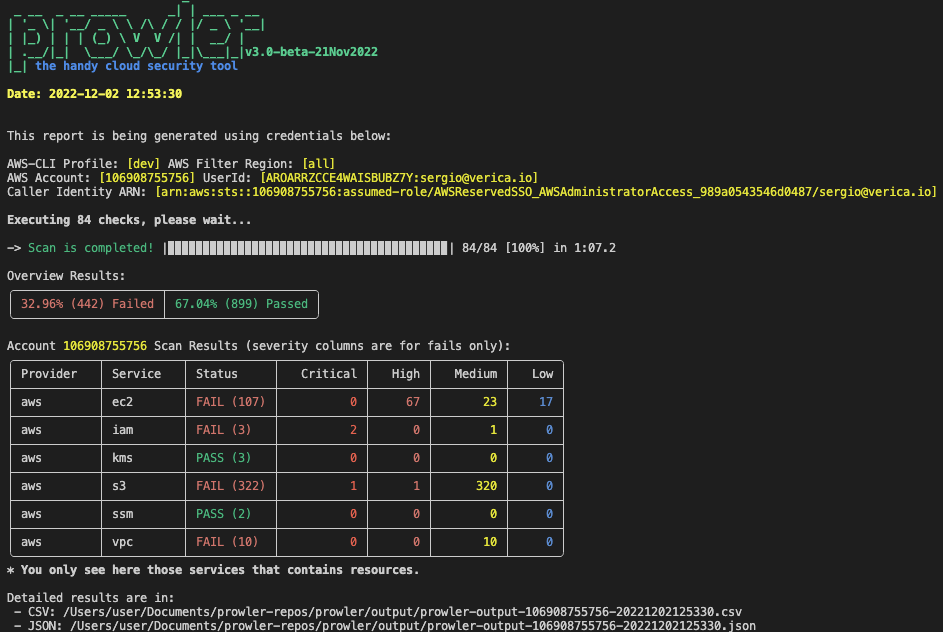
> Running the `prowler` command without options will use your environment variable credentials, see [Requirements](getting-started/requirements/) section to review the credentials settings.
By default, prowler will generate a CSV and a JSON report, however you could generate an HTML or an JSON-ASFF report with `-M` or `--output-modes`:
```console
prowler -M csv json json-asff html
```
You can use `-l`/`--list-checks` or `--list-services` to list all available checks or services within the provider.
```console
prowler --list-checks
prowler --list-services
```
For executing specific checks or services you can use options `-c`/`checks` or `-s`/`services`:
```console
prowler azure --checks storage_blob_public_access_level_is_disabled
prowler aws --services s3 ec2
```
Also, checks and services can be excluded with options `-e`/`--excluded-checks` or `--excluded-services`:
```console
prowler aws --excluded-checks s3_bucket_public_access
prowler azure --excluded-services defender iam
```
You can always use `-h`/`--help` to access to the usage information and all the possible options:
```console
prowler -h
```
### AWS
Use a custom AWS profile with `-p`/`--profile` and/or AWS regions which you want to audit with `-f`/`--filter-region`:
```console
prowler aws --profile custom-profile -f us-east-1 eu-south-2
```
> By default, `prowler` will scan all AWS regions.
### Azure
With Azure you need to specify which auth method is going to be used:
```console
# To use service principal authentication
prowler azure --sp-env-auth
# To use az cli authentication
prowler azure --az-cli-auth
# To use browser authentication
prowler azure --browser-auth
# To use managed identity auth
prowler azure --managed-identity-auth
```
More details in [Requirements](getting-started/requirements.md)
Prowler by default scans all the subscriptions that is allowed to scan, if you want to scan a single subscription or various concrete subscriptions you can use the following flag (using az cli auth as example):
```console
prowler azure --az-cli-auth --subscription-ids ...
```