mirror of
https://github.com/ghndrx/prowler.git
synced 2026-02-10 06:45:08 +00:00

252 lines
12 KiB
Markdown
252 lines
12 KiB
Markdown
<p align="center">
|
|
<img align="center" src="https://github.com/prowler-cloud/prowler/blob/62c1ce73bbcdd6b9e5ba03dfcae26dfd165defd9/docs/img/prowler-pro-dark.png?raw=True#gh-dark-mode-only" width="150" height="36">
|
|
<img align="center" src="https://github.com/prowler-cloud/prowler/blob/62c1ce73bbcdd6b9e5ba03dfcae26dfd165defd9/docs/img/prowler-pro-light.png?raw=True#gh-light-mode-only" width="15%" height="15%">
|
|
</p>
|
|
<p align="center">
|
|
<b><i>See all the things you and your team can do with ProwlerPro at <a href="https://prowler.pro">prowler.pro</a></i></b>
|
|
</p>
|
|
<hr>
|
|
<p align="center">
|
|
<img src="https://user-images.githubusercontent.com/3985464/113734260-7ba06900-96fb-11eb-82bc-d4f68a1e2710.png" />
|
|
</p>
|
|
<p align="center">
|
|
<a href="https://join.slack.com/t/prowler-workspace/shared_invite/zt-1hix76xsl-2uq222JIXrC7Q8It~9ZNog"><img alt="Slack Shield" src="https://img.shields.io/badge/slack-prowler-brightgreen.svg?logo=slack"></a>
|
|
<a href="https://pypi.org/project/prowler-cloud/"><img alt="Python Version" src="https://img.shields.io/pypi/v/prowler.svg"></a>
|
|
<a href="https://pypi.python.org/pypi/prowler-cloud/"><img alt="Python Version" src="https://img.shields.io/pypi/pyversions/prowler.svg"></a>
|
|
<a href="https://pypistats.org/packages/prowler"><img alt="PyPI Prowler Downloads" src="https://img.shields.io/pypi/dw/prowler.svg?label=prowler%20downloads"></a>
|
|
<a href="https://pypistats.org/packages/prowler-cloud"><img alt="PyPI Prowler-Cloud Downloads" src="https://img.shields.io/pypi/dw/prowler-cloud.svg?label=prowler-cloud%20downloads"></a>
|
|
<a href="https://formulae.brew.sh/formula/prowler#default"><img alt="Brew Prowler Downloads" src="https://img.shields.io/homebrew/installs/dm/prowler?label=brew%20downloads"></a>
|
|
<a href="https://hub.docker.com/r/toniblyx/prowler"><img alt="Docker Pulls" src="https://img.shields.io/docker/pulls/toniblyx/prowler"></a>
|
|
<a href="https://hub.docker.com/r/toniblyx/prowler"><img alt="Docker" src="https://img.shields.io/docker/cloud/build/toniblyx/prowler"></a>
|
|
<a href="https://hub.docker.com/r/toniblyx/prowler"><img alt="Docker" src="https://img.shields.io/docker/image-size/toniblyx/prowler"></a>
|
|
<a href="https://gallery.ecr.aws/prowler-cloud/prowler"><img width="120" height=19" alt="AWS ECR Gallery" src="https://user-images.githubusercontent.com/3985464/151531396-b6535a68-c907-44eb-95a1-a09508178616.png"></a>
|
|
</p>
|
|
<p align="center">
|
|
<a href="https://github.com/prowler-cloud/prowler"><img alt="Repo size" src="https://img.shields.io/github/repo-size/prowler-cloud/prowler"></a>
|
|
<a href="https://github.com/prowler-cloud/prowler/issues"><img alt="Issues" src="https://img.shields.io/github/issues/prowler-cloud/prowler"></a>
|
|
<a href="https://github.com/prowler-cloud/prowler/releases"><img alt="Version" src="https://img.shields.io/github/v/release/prowler-cloud/prowler?include_prereleases"></a>
|
|
<a href="https://github.com/prowler-cloud/prowler/releases"><img alt="Version" src="https://img.shields.io/github/release-date/prowler-cloud/prowler"></a>
|
|
<a href="https://github.com/prowler-cloud/prowler"><img alt="Contributors" src="https://img.shields.io/github/contributors-anon/prowler-cloud/prowler"></a>
|
|
<a href="https://github.com/prowler-cloud/prowler"><img alt="License" src="https://img.shields.io/github/license/prowler-cloud/prowler"></a>
|
|
<a href="https://twitter.com/ToniBlyx"><img alt="Twitter" src="https://img.shields.io/twitter/follow/toniblyx?style=social"></a>
|
|
<a href="https://twitter.com/prowlercloud"><img alt="Twitter" src="https://img.shields.io/twitter/follow/prowlercloud?style=social"></a>
|
|
</p>
|
|
|
|
# Description
|
|
|
|
`Prowler` is an Open Source security tool to perform AWS and Azure security best practices assessments, audits, incident response, continuous monitoring, hardening and forensics readiness.
|
|
|
|
It contains hundreds of controls covering CIS, PCI-DSS, ISO27001, GDPR, HIPAA, FFIEC, SOC2, AWS FTR, ENS and custom security frameworks.
|
|
|
|
# 📖 Documentation
|
|
|
|
The full documentation can now be found at [https://docs.prowler.cloud](https://docs.prowler.cloud)
|
|
|
|
## Looking for Prowler v2 documentation?
|
|
For Prowler v2 Documentation, please go to https://github.com/prowler-cloud/prowler/tree/2.12.1.
|
|
|
|
# ⚙️ Install
|
|
|
|
## Pip package
|
|
Prowler is available as a project in [PyPI](https://pypi.org/project/prowler-cloud/), thus can be installed using pip with Python >= 3.9:
|
|
|
|
```console
|
|
pip install prowler
|
|
prowler -v
|
|
```
|
|
More details at https://docs.prowler.cloud
|
|
|
|
## Containers
|
|
|
|
The available versions of Prowler are the following:
|
|
|
|
- `latest`: in sync with master branch (bear in mind that it is not a stable version)
|
|
- `<x.y.z>` (release): you can find the releases [here](https://github.com/prowler-cloud/prowler/releases), those are stable releases.
|
|
- `stable`: this tag always point to the latest release.
|
|
|
|
The container images are available here:
|
|
|
|
- [DockerHub](https://hub.docker.com/r/toniblyx/prowler/tags)
|
|
- [AWS Public ECR](https://gallery.ecr.aws/prowler-cloud/prowler)
|
|
|
|
## From Github
|
|
|
|
Python >= 3.9 is required with pip and poetry:
|
|
|
|
```
|
|
git clone https://github.com/prowler-cloud/prowler
|
|
cd prowler
|
|
poetry shell
|
|
poetry install
|
|
python prowler.py -v
|
|
```
|
|
|
|
# 📐✏️ High level architecture
|
|
|
|
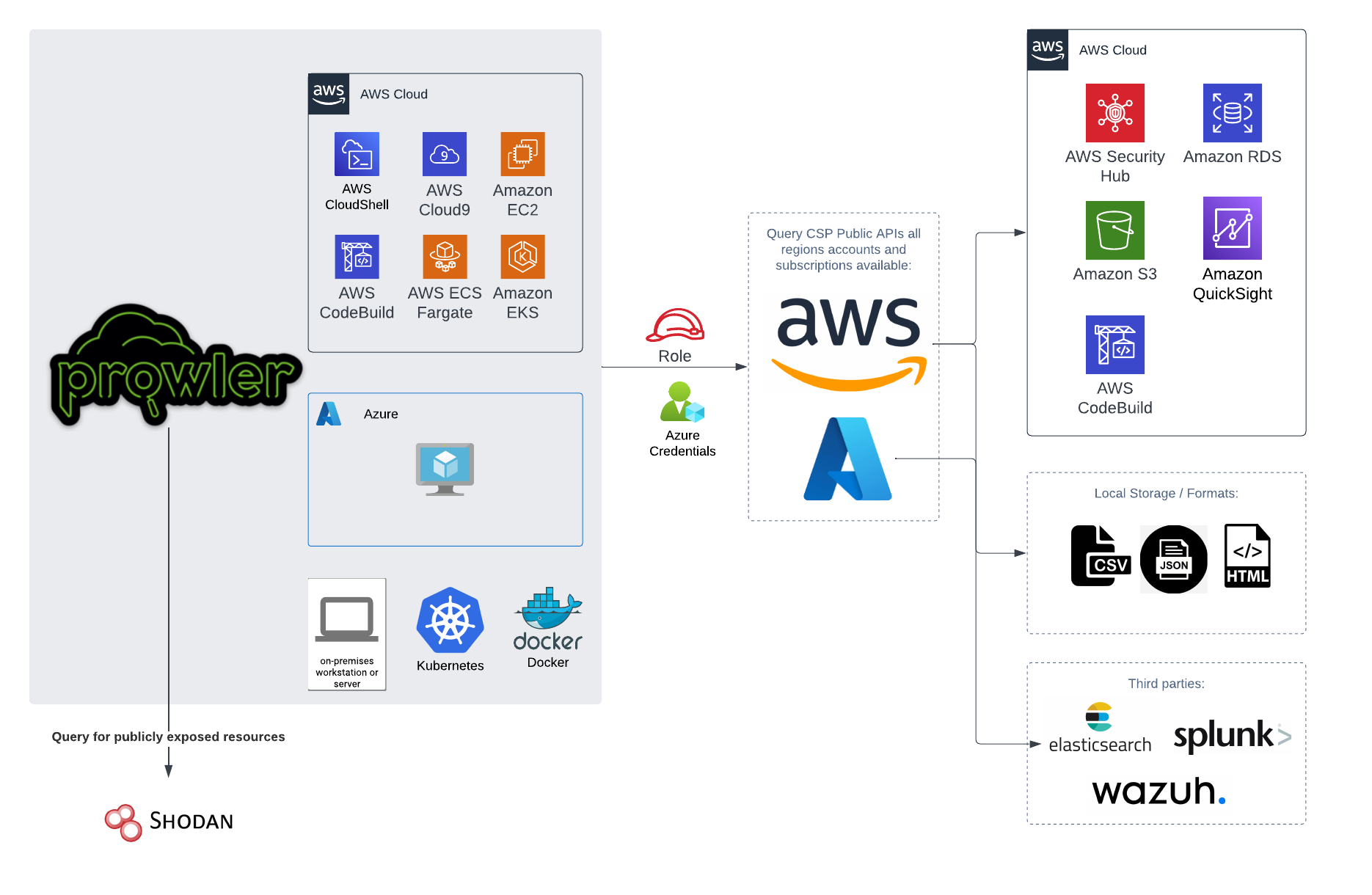
You can run Prowler from your workstation, an EC2 instance, Fargate or any other container, Codebuild, CloudShell and Cloud9.
|
|
|
|
|
|
|
|
# 📝 Requirements
|
|
|
|
Prowler has been written in Python using the [AWS SDK (Boto3)](https://boto3.amazonaws.com/v1/documentation/api/latest/index.html#) and [Azure SDK](https://azure.github.io/azure-sdk-for-python/).
|
|
## AWS
|
|
|
|
Since Prowler uses AWS Credentials under the hood, you can follow any authentication method as described [here](https://docs.aws.amazon.com/cli/latest/userguide/cli-configure-quickstart.html#cli-configure-quickstart-precedence).
|
|
Make sure you have properly configured your AWS-CLI with a valid Access Key and Region or declare AWS variables properly (or instance profile/role):
|
|
|
|
```console
|
|
aws configure
|
|
```
|
|
|
|
or
|
|
|
|
```console
|
|
export AWS_ACCESS_KEY_ID="ASXXXXXXX"
|
|
export AWS_SECRET_ACCESS_KEY="XXXXXXXXX"
|
|
export AWS_SESSION_TOKEN="XXXXXXXXX"
|
|
```
|
|
|
|
Those credentials must be associated to a user or role with proper permissions to do all checks. To make sure, add the following AWS managed policies to the user or role being used:
|
|
|
|
- arn:aws:iam::aws:policy/SecurityAudit
|
|
- arn:aws:iam::aws:policy/job-function/ViewOnlyAccess
|
|
|
|
> Moreover, some read-only additional permissions are needed for several checks, make sure you attach also the custom policy [prowler-additions-policy.json](https://github.com/prowler-cloud/prowler/blob/master/permissions/prowler-additions-policy.json) to the role you are using.
|
|
|
|
> If you want Prowler to send findings to [AWS Security Hub](https://aws.amazon.com/security-hub), make sure you also attach the custom policy [prowler-security-hub.json](https://github.com/prowler-cloud/prowler/blob/master/permissions/prowler-security-hub.json).
|
|
|
|
## Azure
|
|
|
|
Prowler for Azure supports the following authentication types:
|
|
|
|
- Service principal authentication by environment variables (Enterprise Application)
|
|
- Current az cli credentials stored
|
|
- Interactive browser authentication
|
|
- Managed identity authentication
|
|
|
|
### Service Principal authentication
|
|
|
|
To allow Prowler assume the service principal identity to start the scan, it is needed to configure the following environment variables:
|
|
|
|
```console
|
|
export AZURE_CLIENT_ID="XXXXXXXXX"
|
|
export AZURE_TENANT_ID="XXXXXXXXX"
|
|
export AZURE_CLIENT_SECRET="XXXXXXX"
|
|
```
|
|
|
|
If you try to execute Prowler with the `--sp-env-auth` flag and those variables are empty or not exported, the execution is going to fail.
|
|
### AZ CLI / Browser / Managed Identity authentication
|
|
|
|
The other three cases do not need additional configuration, `--az-cli-auth` and `--managed-identity-auth` are automated options, `--browser-auth` needs the user to authenticate using the default browser to start the scan.
|
|
|
|
### Permissions
|
|
|
|
To use each one, you need to pass the proper flag to the execution. Prowler for Azure handles two types of permission scopes, which are:
|
|
|
|
- **Azure Active Directory permissions**: Used to retrieve metadata from the identity assumed by Prowler and future AAD checks (not mandatory to have access to execute the tool)
|
|
- **Subscription scope permissions**: Required to launch the checks against your resources, mandatory to launch the tool.
|
|
|
|
|
|
#### Azure Active Directory scope
|
|
|
|
Azure Active Directory (AAD) permissions required by the tool are the following:
|
|
|
|
- `Directory.Read.All`
|
|
- `Policy.Read.All`
|
|
|
|
|
|
#### Subscriptions scope
|
|
|
|
Regarding the subscription scope, Prowler by default scans all the subscriptions that is able to list, so it is required to add the following RBAC builtin roles per subscription to the entity that is going to be assumed by the tool:
|
|
|
|
- `Security Reader`
|
|
- `Reader`
|
|
|
|
|
|
# 💻 Basic Usage
|
|
|
|
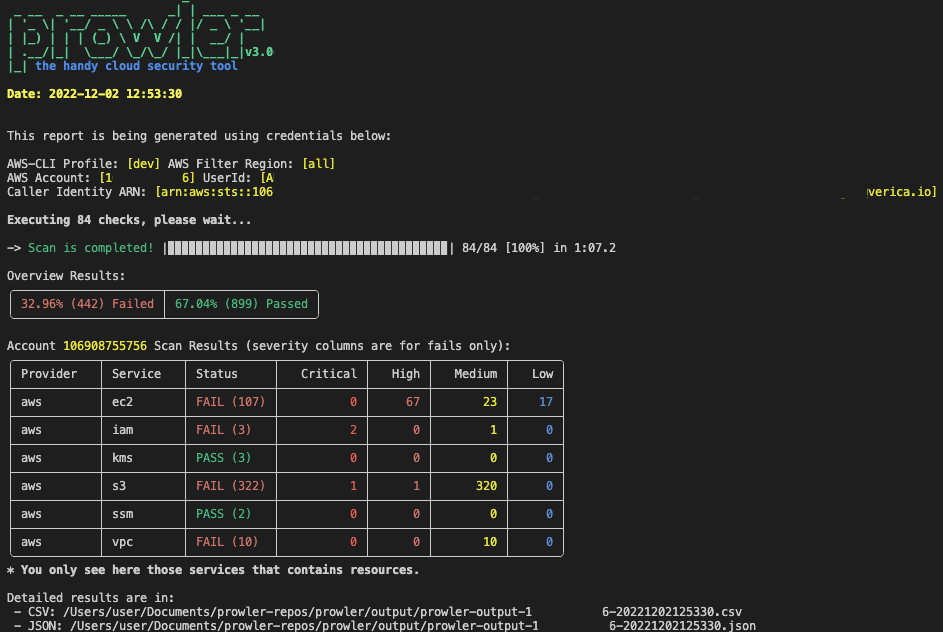
To run prowler, you will need to specify the provider (e.g aws or azure):
|
|
|
|
```console
|
|
prowler <provider>
|
|
```
|
|
|
|
|
|
|
|
> Running the `prowler` command without options will use your environment variable credentials.
|
|
|
|
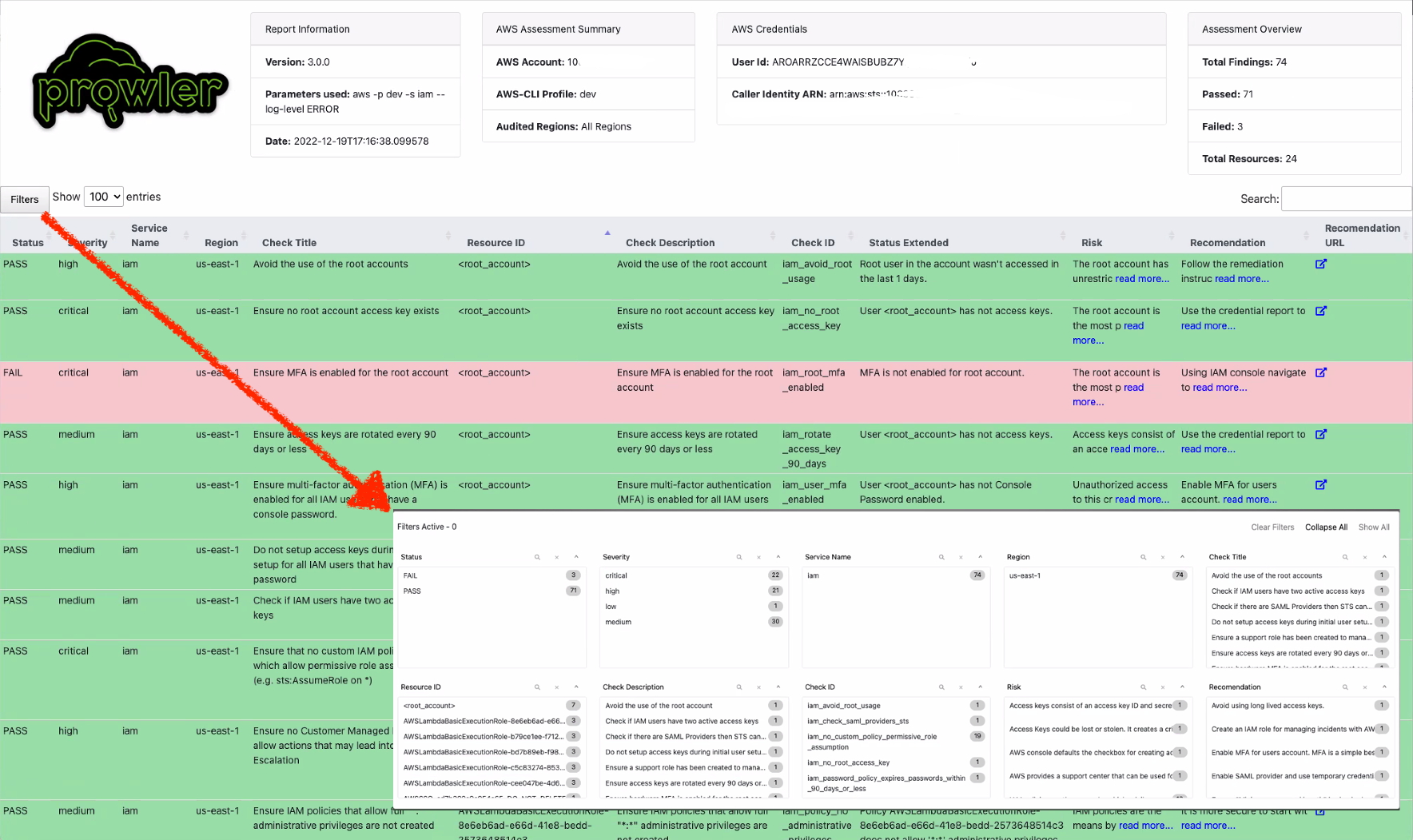
By default, prowler will generate a CSV, a JSON and a HTML report, however you can generate JSON-ASFF (only for AWS Security Hub) report with `-M` or `--output-modes`:
|
|
|
|
```console
|
|
prowler <provider> -M csv json json-asff html
|
|
```
|
|
|
|
The html report will be located in the `output` directory as the other files and it will look like:
|
|
|
|
|
|
|
|
You can use `-l`/`--list-checks` or `--list-services` to list all available checks or services within the provider.
|
|
|
|
```console
|
|
prowler <provider> --list-checks
|
|
prowler <provider> --list-services
|
|
```
|
|
|
|
For executing specific checks or services you can use options `-c`/`--checks` or `-s`/`--services`:
|
|
|
|
```console
|
|
prowler aws --checks s3_bucket_public_access
|
|
prowler aws --services s3 ec2
|
|
```
|
|
|
|
Also, checks and services can be excluded with options `-e`/`--excluded-checks` or `--excluded-services`:
|
|
|
|
```console
|
|
prowler aws --excluded-checks s3_bucket_public_access
|
|
prowler aws --excluded-services s3 ec2
|
|
```
|
|
|
|
You can always use `-h`/`--help` to access to the usage information and all the possible options:
|
|
|
|
```console
|
|
prowler -h
|
|
```
|
|
|
|
## Checks Configurations
|
|
Several Prowler's checks have user configurable variables that can be modified in a common **configuration file**.
|
|
This file can be found in the following path:
|
|
```
|
|
prowler/config/config.yaml
|
|
```
|
|
|
|
## AWS
|
|
|
|
Use a custom AWS profile with `-p`/`--profile` and/or AWS regions which you want to audit with `-f`/`--filter-region`:
|
|
|
|
```console
|
|
prowler aws --profile custom-profile -f us-east-1 eu-south-2
|
|
```
|
|
> By default, `prowler` will scan all AWS regions.
|
|
|
|
## Azure
|
|
|
|
With Azure you need to specify which auth method is going to be used:
|
|
|
|
```console
|
|
prowler azure [--sp-env-auth, --az-cli-auth, --browser-auth, --managed-identity-auth]
|
|
```
|
|
> By default, `prowler` will scan all Azure subscriptions.
|
|
|
|
# 🎉 New Features
|
|
|
|
- Python: we got rid of all bash and it is now all in Python.
|
|
- Faster: huge performance improvements (same account from 2.5 hours to 4 minutes).
|
|
- Developers and community: we have made it easier to contribute with new checks and new compliance frameworks. We also included unit tests.
|
|
- Multi-cloud: in addition to AWS, we have added Azure, we plan to include GCP and OCI soon, let us know if you want to contribute!
|
|
|
|
# 📃 License
|
|
|
|
Prowler is licensed as Apache License 2.0 as specified in each file. You may obtain a copy of the License at
|
|
<http://www.apache.org/licenses/LICENSE-2.0>
|